 Add Country Code
Add the country code to all your contacts in one tap
Stop editing numbers one by one. Add Country Code converts your whole contact list to international format in seconds, so calls and messages work wherever you are.
Why your contacts need a country code
Numbers saved without a + country code only work in the country where you saved them. That causes problems the moment something changes.
Travelling or moving abroad
Calls to family and friends fail because your phone dials them as local numbers in the new country.
Contacts missing in chat apps
WhatsApp, Signal and Telegram match contacts by full international number. Without it, friends don't show up.
New SIM or dual SIM
Switching to a foreign SIM or using two SIMs from different countries makes local numbers ambiguous.
Everything you need, nothing you don't
Built to make a risky bulk change feel safe.
Bulk update
Add the country code to hundreds or thousands of contacts at once. Updates take well under a second.
Preview first
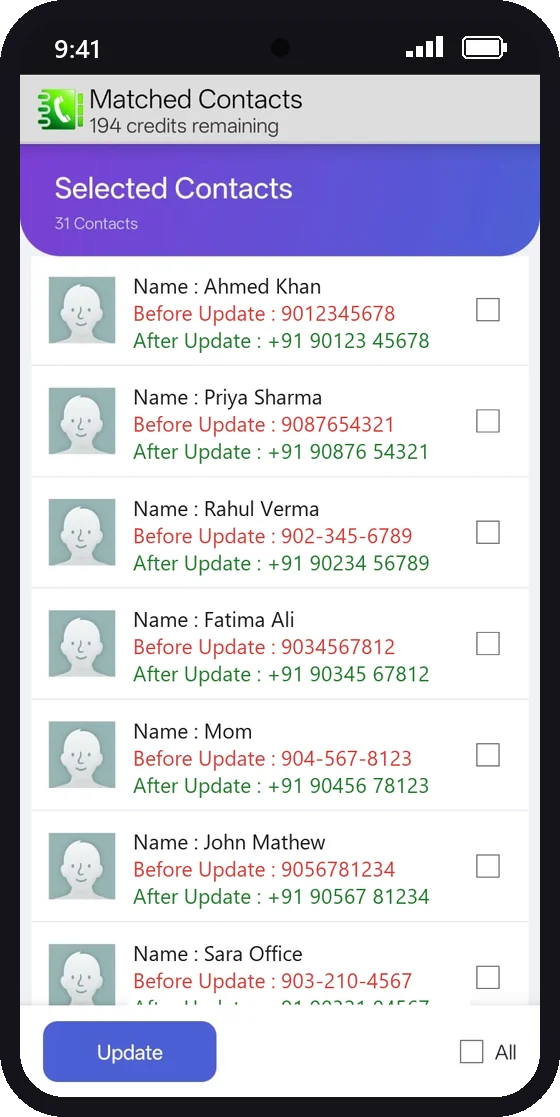
See every number before and after the change, and untick any contact you want to leave alone.
Automatic backup
Your numbers are backed up on your phone before anything changes.
One-tap revert
Changed your mind? Undo all changes with a single tap.
Smart filters
Pick numbers by starting digits and length, and remove the leading trunk code (like 0) automatically.
Private by design
No contact data is collected or shared. Everything, including the backup, stays on your device.
How it works
Most people are done in under a minute.
- Back up your contacts. One tap saves a copy on your phone.
- Choose your filter. For example, numbers starting with 9 that are 10 digits long.
- Pick the country. The app fills in the code, such as +91, +92, +44 or +966.
- Preview and update. Check the before/after list, then tap Update.


Guides
Step-by-step help for the most common contact problems.
Frequently asked questions
Is it free?
Yes. You can update up to 200 contacts for free. If you have more, a one-time in-app purchase unlocks unlimited updates. There is no subscription.
Will it change numbers that already have a country code?
No. Numbers that already start with + are already in international format and are left as they are.
What if something goes wrong?
The app backs up your numbers before changing anything. Tap Revert Changes to restore them.
Do you upload my contacts?
No. Your contacts are read and updated on your phone only. We never copy, upload or share them. See our privacy policy.
Is there an iPhone version?
Not yet. Add Country Code is currently available for Android.